|
How much does it cost?
You will find that courses on EduTech-GoLearning are very affordably priced- especially if you take the ”on-costs” of seminars and workshops into consideration. You do not need to use your billable hours to keep up with your CPD, nor do you have traveling or any living-out expenses to consider. Once you have paid for a course on EduTech-GoLearning you have it available 24/7 and can do the questionnaire to unlock your CPD-certificate whenever you are ready
How do I register and what do I need to do so?
- Click on the “Create an account” tab on the top menu bar to open the registration page. It takes less than a minute to complete but make sure to have your council or institute registration number handy if you wish to earn CPD points. You will also require your ID number.
- Choose a username and password that you will always remember. Here are some pointers to assist you in doing so:
User name : Select a combination of your name and surname i.e. Piet Viljoen becomes pietviljoen or use your initials and surname i.e. pjviljoen.
Password : Combine your name with a number such as your anniversary date i.e. piet231067
- Set up your profile in as much detail as possible. Remember to state which council you wish to submit your certificate to as well as stating your Council number (not your ASAQS or voluntary association number!). Consider uploading a photograph of yourself, so that members of the EduTech-GoLearning community can see what you look like!
How do I enroll for a course?
After registration:
Click on the link on the menu bar to view our Course List in the open section of the website to obtain a brief overview of the available courses.
To view information about a course once you are logged into your account, do so by clicking on a section summary (i.e. “Shared Courses”) appearing in the course list on the Home page which contains a collapsed directory of courses. Click on the gray triangle to the left of a section in the directory to see the courses it contains. You may also use the search function below the directory to search key words in the title to obtain more information about the course.
The My home personalised page lists all the courses you have purchased. The link to your home page is just below the Home link in the navigation block on the left of your screen.
You can select to add a module to your shopping basket by clicking on the module title. You will then be taken to a screen stating the course and it’s price. Clicking on the Add this course to your cart button adds the course yo your shopping basket.
Remember to have a valid credit card ready as you will require details from it to complete the transaction.
You will receive an e-mailed confirmation of your purchase as soon as the transaction is cleared by your bank. The course is then automatically added to your list of course material on the My home page.
Download the course material and study it before logging into your account again and attempting the quiz (the link is usually just below the study material you have downloaded.
Read the section on the CPD certificate below to find out how the CPD certificate is unlocked.
CPD Certificate
When you view your course material you will note that the CPD certificate is grayed out.
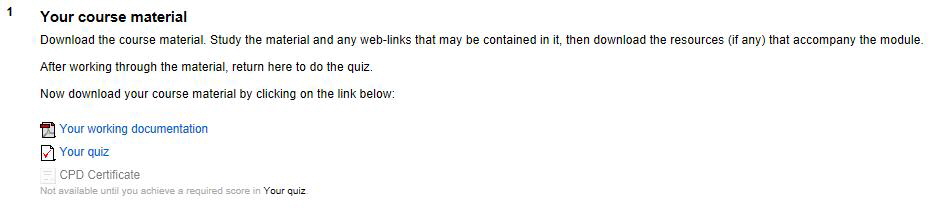
Score more that 60% in your quiz and the CPD certificate will become an active link.
Download the certificate in PDF format. Sign it to attest that you have done the test on your own, then follow the instructions on the home page of EduTech-GoLearning to submit it to the SACQSP or go to the SACQSP website, then click on CPD in the menu to find out how.
The EduTech-GoLearning system retains a database of all your activities and we are able to verify when you sat a test and what the results of that test was.
Getting to know the navigation areas
The EduTech-GoLearning website consists of a public section that can be viewed without creating an account and a closed administrative section that can only be accessed by creating your free account on EduTech-GoLearning.
The top navigation area is used to navigate the administrative (closed) area of the website and it shows links and logging into your personal page after to the home page, creating a new account creation.
The menu bar on the left is used to navigate the public (open) areas of our website.
The bottom menu bar is used to navigate our policies and procedures.
Do you have any further questions?
Please submit them with the reply form provided in Contact us
|